TL;DR
Most websites do not need a magic number of pages for SEO; they need enough useful, indexable pages to cover real services, locations, products, and buyer questions. A small business can often start with 5 to 10 strong pages, while ecommerce and content-led sites usually need more structured pages built around search intent.
A website can rank with five excellent pages, while a larger site can struggle with hundreds of weak ones. The real answer to how many pages does a website need for seo depends on search intent, business model, local coverage, and content quality, not a universal page count. Search engine optimization: the practice of improving the visibility and performance of websites and web pages in search engine results pages. Tools such as Earlyseo help teams plan the right page structure before publishing more content than the site can support.
Table of Contents
How many pages does a website need for SEO?
A website needs as many SEO pages as it takes to answer distinct search intents without creating thin, duplicate, or low-value URLs. For many small businesses, that means 5 to 10 core pages at launch; for ecommerce, local service, and content-led sites, the number grows as products, locations, and topics expand.
A 2011 SitePoint discussion reached a still-useful answer: there is no fixed ideal number of pages, and a site should add as many pages as needed for its purpose SitePoint forum discussion. That advice still holds in 2026, but the quality bar is higher because search engines and AI answer engines now reward clearer topical coverage.
Key insight: page count is not an SEO ranking factor by itself; useful coverage, internal links, crawlable structure, and unique value matter more.
Practical starting ranges by website type
| Website type | Practical SEO page range | Pages usually needed first |
|---|---|---|
| Local service business | 5 to 15 pages | Home, services, service area, about, contact, FAQs |
| Startup or SaaS site | 8 to 25 pages | Home, features, use cases, pricing, comparisons, docs |
| Ecommerce store | 20 to 500+ pages | Category, product, collection, shipping, returns, guides |
| Blog-led brand | 15 to 100+ pages | Pillars, supporting posts, author pages, topic hubs |
| Multi-location business | 10 to 200+ pages | Location pages, service pages, local proof, contact pages |
The better question is not "how many pages," but "how many useful search intents can the business serve?" A plumber with three services and one city may need fewer pages than a Shopify brand with 80 products and several buying guides.
Earlyseo planning works best when each page has a job: rank for a query, explain a product, support conversion, or help search engines understand the site.
What pages should a new website publish first?
A new website should publish the smallest complete set of pages that explains the business, targets its main searches, and gives visitors enough proof to act. Most early SEO sites should avoid publishing dozens of filler pages before the core commercial pages are strong.

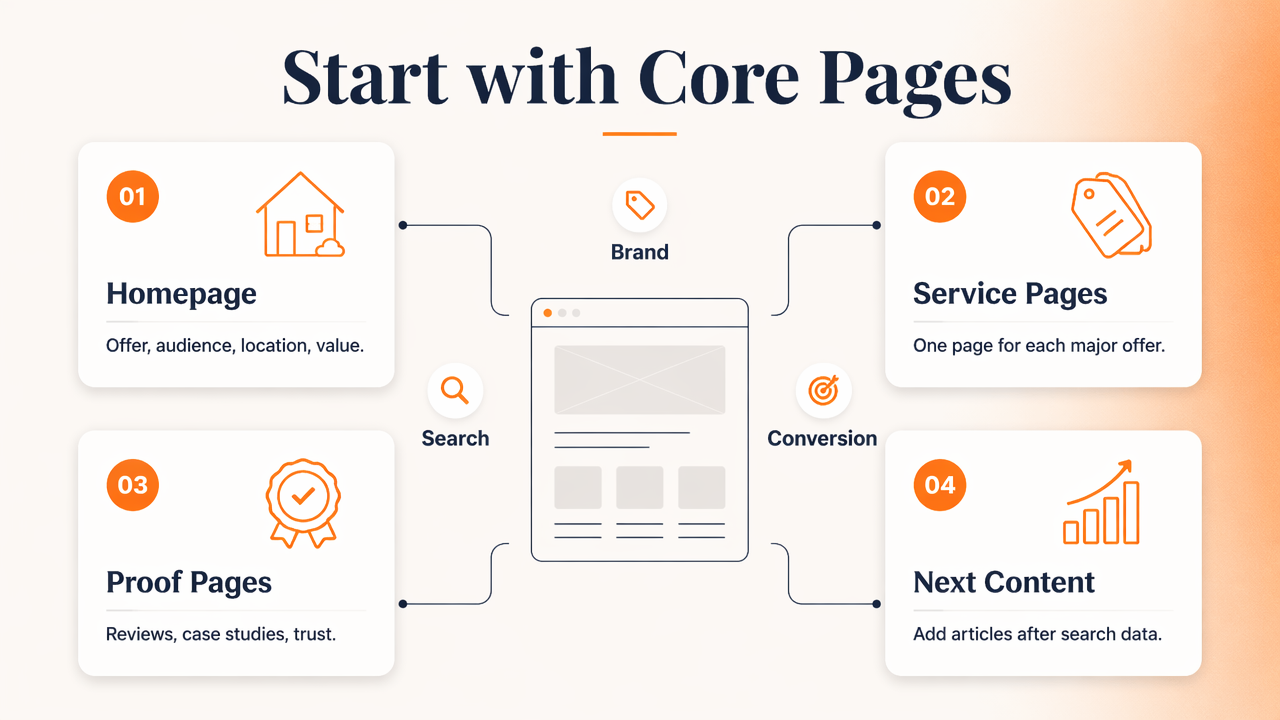
Core pages are the foundation because they connect brand meaning, services, and conversions. A business can then add supporting content once search data shows what people ask before buying.
Minimum useful page set
- Homepage: states the offer, audience, location or market, and main value.
- Service or product pages: give each major offer its own page when search intent differs.
- About page: builds trust with company background, credentials, and proof.
- Contact page: includes address, phone, forms, hours, and local signals when relevant.
- FAQ or resource page: answers pre-sale questions that do not deserve full pages yet.
- Blog or guide hub: organizes educational content when content marketing is part of growth.
A restaurant, consultant, or local contractor may only need this set at first. A software company often needs more because buyers compare features, integrations, security, pricing, and implementation details.
For teams using WordPress, publishing cadence and content templates matter as much as raw count. The Earlyseo WordPress integration can support a cleaner workflow for building pages around planned topics rather than random posts.
When one page should become several
A page should split into multiple pages when one URL tries to rank for unrelated searches. For example, "roof repair," "roof replacement," and "commercial roofing" can deserve separate pages if each service has different buyers, examples, pricing factors, and FAQs.
A page should stay consolidated when the sections are minor variations of the same intent. Splitting "emergency roof repair near me" and "24 hour roof repair" into separate thin pages may create weaker content instead of stronger relevance.
How should page count change by business model?
Page count should grow only when the business has enough distinct products, services, locations, or educational topics to justify separate URLs. A site architecture that mirrors real business structure usually performs better than one built around arbitrary keyword volume.

Different business models need different levels of depth. Ecommerce sites need category and product coverage. Local businesses need service-area clarity. SaaS companies need use cases, integrations, documentation, and comparison pages.
SEO page planning matrix
| Business model | Page-count driver | Good expansion idea | Page to avoid creating too early |
|---|---|---|---|
| Local business | Services and locations | One page per major service and main city | Doorway-style city pages with copied text |
| Ecommerce | Categories and products | Collection pages with buying guidance | Near-duplicate product variants |
| SaaS | Use cases and integrations | Pages for real workflows and supported tools | Feature pages with no search demand |
| Consultant | Problems and outcomes | Case studies and service explainers | Generic blog posts outside expertise |
| Publisher or blog | Topic authority | Pillar pages with focused support posts | Short posts repeating the same answer |
Ecommerce creates the biggest page-count spread. A store with 12 products may need fewer than 40 indexable pages, while a larger catalog can need hundreds. Shopify teams can use the Earlyseo Shopify integration to keep product and collection growth aligned with search-focused structure.
A content-heavy brand should also plan internal links before adding volume. Related resources, category hubs, and blog archives can help search engines understand hierarchy. The Earlyseo blog hub is a useful reference point for organizing ongoing educational content into a navigable structure.
Local SEO page count example
A local HVAC company serving one city might start with:
- Home
- Air conditioning repair
- Furnace repair
- Installation
- Maintenance plans
- Service area
- About
- Contact
- FAQs
- 3 to 5 helpful guides
That creates roughly 10 to 15 pages, enough to target core searches without pretending to be a national publisher. More pages become useful when the company adds real locations, services, financing options, or documented case studies.
When can too many pages hurt SEO?
Too many pages can hurt SEO when they waste crawl attention, repeat the same intent, dilute internal links, or create a poor visitor experience. The issue is not size; large sites rank well when pages are distinct, useful, and organized.
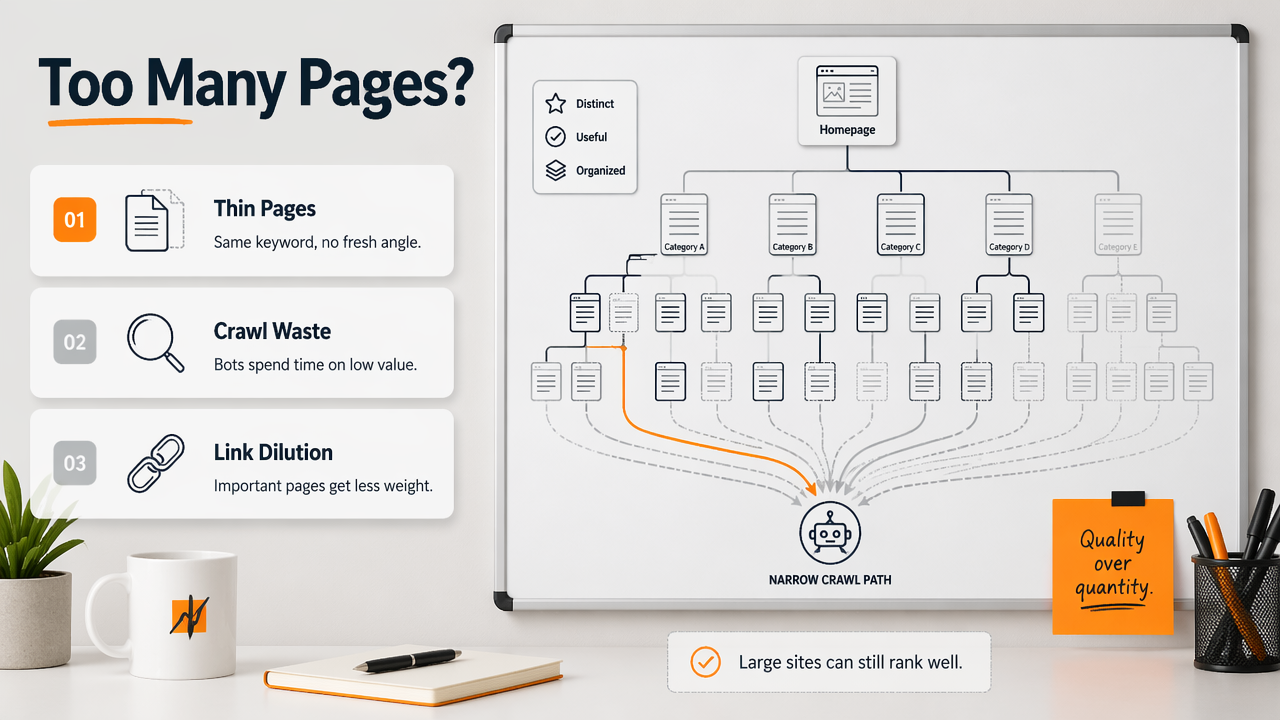
Thin pages are the common problem. A page with a slightly different keyword but no fresh angle rarely helps. Search engines can ignore it, rank a stronger competitor, or treat the site as lower quality overall.
A 2023 review by Esma Aïmeur, Sabrine Amri, and Gilles Brassard examined misinformation and low-quality information patterns in social media, which reinforces a wider publishing lesson: unclear, repetitive information reduces trust Springer review. SEO content should make claims specific, sourced, and easy to verify.
Page-count warning signs
- Several pages target the same keyword with only small wording changes.
- Location pages use the same copy except for the city name.
- Blog posts answer the same beginner question repeatedly.
- Product pages have manufacturer copy with little original detail.
- Important pages are more than three or four clicks from the homepage.
- Search Console shows impressions spread across many weak URLs but few clicks.
A smaller site with 20 focused pages can outperform a larger site with 200 pages if the smaller site has clearer intent, stronger proof, and better internal links.
How to decide whether to keep, merge, or remove pages
| Page condition | Best action | Reason |
|---|---|---|
| Unique intent, good traffic, useful content | Keep and improve | The page has SEO value |
| Same intent as a stronger page | Merge | Consolidation can strengthen relevance |
| No traffic, no links, no business value | Remove or noindex | Indexing low-value pages adds clutter |
| Useful for users but not search | Keep but de-emphasize | Not every page needs to rank |
| Product out of stock temporarily | Keep with alternatives | Demand may return |
The safest audit method is practical: map every page to one primary intent and one business purpose. If neither can be named, the page probably needs revision.
How should websites plan SEO pages in 2026 and beyond?
Websites should plan SEO pages around topic coverage, answer quality, and machine-readable structure as search shifts toward AI summaries and richer result formats. In 2026, pages need to satisfy readers and also make answers easy for search systems to extract.
AI search does not remove the need for pages. It raises the need for clear definitions, concise answers, comparison tables, FAQs, and visible expertise. A vague 700-word page is less useful than a focused page with a direct answer, proof, and well-labeled sections.
A simple 2026 page-planning workflow
- List core offers: services, products, locations, use cases, and customer segments.
- Group search intents: informational, commercial, local, transactional, and support queries.
- Assign one main intent per page: avoid multiple unrelated targets on one URL.
- Build internal links: connect money pages, guides, FAQs, and documentation.
- Add structured sections: definitions, tables, examples, and FAQs.
- Review performance quarterly: improve pages with impressions but low clicks first.
Documentation pages also matter for SaaS, apps, and technical products. Clear help content can rank, reduce support load, and support AI understanding. The Earlyseo documentation shows how structured guidance can sit beside marketing pages without competing with them.
For AI visibility, some teams are also testing LLM-facing site files and plain-language entity summaries. The Earlyseo llms.txt resource gives a practical example of how brands can make site context easier for language models to parse.
FAQ: How many pages does a small business website need?
A small business website usually needs 5 to 15 useful pages for SEO at the start. The exact number depends on how many services, locations, and customer questions deserve separate treatment. A one-location business with three services can stay lean, while a multi-service company should build more specific pages.
FAQ: Is a one-page website bad for SEO?
A one-page website is not automatically bad, but it limits SEO reach. One page can rank for a narrow brand or local query, but it cannot cover many services, questions, or comparison searches well. Separate pages help when topics have different intent.
FAQ: Should every blog post target a keyword?
Every blog post should have a clear purpose, but not every post needs a high-volume keyword. Some posts support sales, answer customer objections, earn links, or clarify expertise. Keyword targeting works best when the post also adds original value.
FAQ: How often should a website add new SEO pages?
A website should add new SEO pages when research shows a real search intent or business need. Monthly publishing can work for growing brands, but quality and maintenance matter more than speed. Existing pages with impressions and no clicks often deserve updates before new pages are added.
Conclusion
The practical answer to how many pages does a website need for seo is simple: enough pages to cover real intent, not enough to look big. A small business can start with 5 to 10 strong pages, while ecommerce, SaaS, and multi-location brands should expand only when each new URL has a clear job.
The next step is a page inventory: list every current URL, assign one intent, mark its business purpose, then decide whether to keep, improve, merge, or remove it. For a cleaner plan, the Earlyseo platform can help structure SEO pages around topics, integrations, and answer-ready content. Visit earlyseo.com to turn the page-count question into a practical publishing roadmap.